Font Generator
Free online font generator: type your text once and get 1,000+ cool fonts and fancy text styles to copy and paste into Instagram, TikTok, Discord and more.
Popular Uses for Copy and Paste Fonts
Use this font changer anywhere plain text is allowed, from your Instagram bio to your Discord name.
Instagram Fonts
Aesthetic IG fonts for your bio, captions and highlight names.
TikTok Profiles
Add fancy text to your TikTok name, bio and comments.
Font for Discord
Style your nickname, server name, roles and chat messages.
Gaming Names
Turn your name into symbols and cool letters for PUBG, Free Fire and other games.
X (Twitter)
Use bold or italic text in posts and your display name.
YouTube Titles
Catch attention with stylish text in titles, descriptions and community posts.
Facebook Posts
Highlight key words in posts and comments with fancy letters.
Send cute fonts in chats, group names and status updates.
How to Use the Font Generator
Change your text into a new font style in three quick steps.
Type Your Text
Enter a word, name or sentence in the text box. The font changer converts it instantly as you type.
Pick a Font Style
Browse different fonts and letter styles, or tap a filter such as Fancy, Cursive, Bold, Gothic or Small.
Copy and Paste
Press Copy on any card, then paste the text into a bio, comment, username or document.
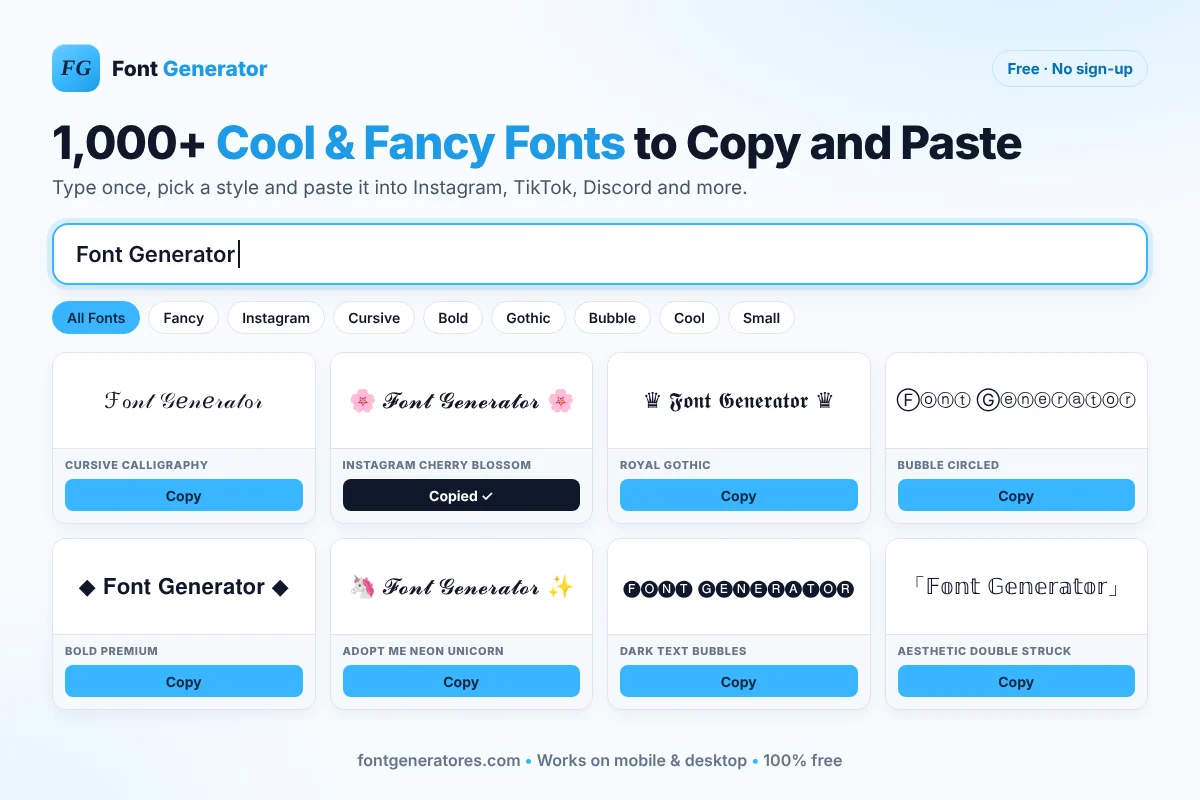
Whether you need a cool font for a gaming profile, fancy letters for an Instagram bio or a bold heading for a post, this free font generator gives you hundreds of text fonts in seconds. There is nothing to download, install or sign up for.
Font Styles You Can Generate
Every style family below has its own generator with even more options.
Fancy Text Generator
A fancy font generator for decorated letters framed with hearts, stars and other cool symbols.
Open generator →Cursive Font Generator
Flowing script styles that double as a calligraphy font generator, ready for cursive copy and paste.
Open generator →Bold Font Generator
Bold and italic font generator styles that stand out in posts and titles.
Open generator →Cool Font Generator
A cool text generator with neon, gaming and symbol styles for usernames.
Open generator →Instagram Font Generator
Instagrammable fonts made for bios, captions and highlights.
Open generator →Gothic Font Generator
Old English blackletter for a dark, classic or tattoo-style look.
Open generator →Small Font Generator
A tiny font generator for small caps and superscript letters.
Open generator →Graffiti Font Generator
Street-style lettering you can customize and download as an image.
Open generator →Why Choose Our Free Font Generator
A simple font generator online that is fast, free and private.
100% Free
Unlimited text fonts with no fees, limits or watermarks.
One-Click Copy
Copy any style to your clipboard with a single tap.
1,000+ Font Styles
Fancy, cursive, bold, italic, gothic and bubble letters plus font symbols in one place.
Mobile Friendly
Works on phones, tablets and desktops with no app to install.
No Sign-Up
Open the page and start typing. Nothing to download or register.
Instant Results
Your text updates in every font style while you type.
How Copy and Paste Fonts Work
Why your text keeps its style after you paste it.
What Are They?
The “fonts” made by this text font generator are really Unicode characters and symbols, part of a universal standard that every modern device understands.
How It Works
Every letter of each font alphabet is swapped for a matching character from Unicode blocks such as Script, Fraktur, Double-Struck and Italic, so your text in font form is still plain text.
Why It's Better
Normal font files must be installed. These characters don’t, so you can copy and paste them anywhere and they keep their look. The characters are defined by the Unicode Consortium.
Browser & Platform Compatibility
Where your copy and paste text works.
Supported Browsers
Modern web browsers fully support the Unicode standard, so you can generate and view these fonts on:
- Google Chrome (Desktop & Mobile)
- Apple Safari (iOS & macOS)
- Mozilla Firefox
- Microsoft Edge
- Opera & Brave
Social Media & Apps
Because they are plain text characters, these fonts work in most social networks, chats and documents:
- Instagram (Bios, Captions, Comments)
- TikTok (Names, Captions)
- X / Twitter (Posts, Display Names)
- Discord & Reddit
- WhatsApp, Telegram & Messenger
- Microsoft Word & Google Docs (most styles)
Explore More Font Generators
Explore our free font generators for every style and platform.
Key Takeaways
Everything you need to know at a glance.
- A font generator turns normal text into Unicode font styles
- 1,000+ fancy, cool and cursive fonts in one place
- Font copy and paste works in most apps
- Ideal for Instagram, TikTok and Discord
- No download or installation needed
- 100% free with no sign-up
- Works on desktop, tablet and mobile
- A few symbols may not show on very old devices
Frequently Asked Questions
Answers about copy and paste fonts and how the tool works.
What is a font generator?
A font generator is an online tool that changes normal text into different font styles. This one converts your letters into Unicode characters, so you can copy and paste fonts anywhere plain text is accepted.
Is this font generator free?
Yes. It is a free font generator with no sign-up, no watermark and no limit on how many styles you copy.
How do I copy and paste fonts?
Type your text, find a style you like and press Copy. Then long-press or right-click where you want the text and choose Paste.
Are these real fonts?
No. They are not font files like TrueType (.ttf) or OpenType (.otf), and this is not a font maker for creating custom font files. They are stylized Unicode characters, which is why they keep their look when you paste them into other apps.
Can I use these fonts on Instagram and TikTok?
Yes. Instagram fonts made here work in bios, captions, comments and names, and the same text works on TikTok.
Which fonts work best for Discord?
Most styles work in Discord nicknames, server names, roles and messages. Bold, italic, cursive and small caps styles are the most reliable.
Can I turn my name into symbols?
Yes. Type your name and pick a decorated style, such as stars, hearts or bubble letters. It works like a symbol generator for gaming profiles and usernames.
Can I use this as a tattoo font generator?
Yes, for ideas. You can compare your name or a word in cursive, gothic and script styles to find tattoo lettering you like. Share your favourite with your tattoo artist, who will draw the final design at full size.
Why do some fonts show as boxes or question marks?
Empty boxes (often called “tofu”) mean the device or app does not have a typeface that supports those Unicode characters. Try a simpler style or update the device.
Can I use these fonts commercially?
Yes. They are standard Unicode characters, not licensed font files, so you can use them in marketing, social media and branding.
Ready to Change Your Font?
Type your text above and copy any of 1,000+ fancy fonts in seconds, 100% free.
Start Generating Now